Lot's of very useful information to solve your problems as far as dealing with many of the typical problems and some not so typical problems that we run into when working on a computer.
Have you ever opened a web page and the first thing that you get is a blast from some audio associated with a video that starts before you can do anything about it?
The kids are sleeping and it's the middle of the night, and some naughty webmaster has set you up for a loud disaster.
So, here is what I found out about how to stop that in the websites that I design.
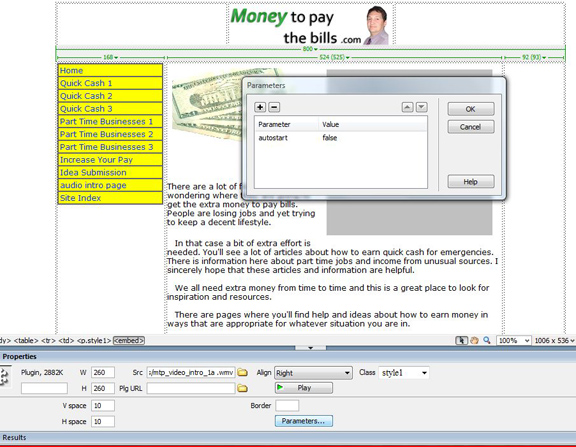
In Dreamweaver, you insert the plug in for the video and change the size numbers in the html code to what size you will want for the player, then left click the video in design view.
Another web design software might well be similar.
On the bottom, (or elsewhere on another program) there will be a parameter box to open.
Open it, and in there type "autostart" as a parameter and "false" as a value.
Then click OK. Here is an example from another website.